
Load testing is one of those things everyone agrees is important — and almost nobody does early.
Sometimes because there is no time. Sometimes because setting up a proper tool feels heavy. Sometimes because “it works locally” and that feels good enough.
Rentgen approaches this problem differently. Instead of replacing professional load-testing tools, it gives you a built-in, low-friction load test that answers one simple question:
Does this API already slow down when a little concurrency is introduced?
What this test is — and what it is not
Rentgen’s load test is not meant to simulate production traffic or push your infrastructure to its limits.
It is intentionally small. Intentionally controlled. Intentionally easy to run.
The goal is not to break the system. The goal is to detect early performance degradation before it turns into a scaling problem.
What was tested
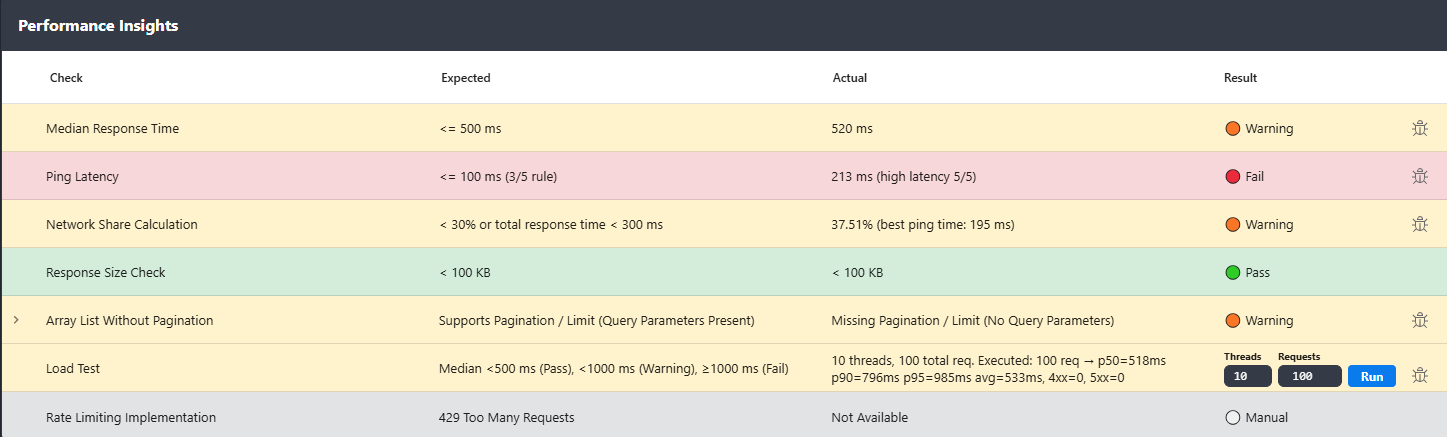
Rentgen executed a lightweight concurrent load test using the same API request that was already validated functionally.
- Threads: 10
- Total requests: 100
- Execution: parallel
During execution, Rentgen measured response time percentiles and evaluated them against clear, opinionated thresholds.
- Median < 500 ms → Pass
- Median < 1000 ms → Warning
- Median ≥ 1000 ms → Fail
What Rentgen found
- Requests executed: 100
- p50: 511 ms
- p90: 992 ms
- p95: 1152 ms
- Average: 574 ms
- 4xx errors: 0
- 5xx errors: 0
Even under minimal concurrency, the median response time crossed the 500 ms threshold and high percentiles exceeded one second.
Why this matters
Ten parallel requests is not traffic. It is barely a warm-up.
If an API starts slowing down at this level, it is usually a sign of deeper issues:
- inefficient database queries
- blocking I/O in request handling
- missing or ineffective caching
- N+1 query patterns
- thread or connection pool saturation
None of these problems require real load to exist. They are already present — concurrency simply exposes them.
Why most teams miss this
Manual API testing is sequential. One request. One response. Everything looks fine.
By the time someone runs a real load test, the API is already in production, the data set is large, and fixing performance becomes expensive.
Rentgen surfaces this earlier, while the API is still being actively developed.
The practical workflow
Running a load test in Rentgen requires two choices:
- number of threads (1–100)
- number of requests (1–10 000)
That’s it.
Need unique data per request? Use dynamic mappings — random strings, integers, or emails — directly in the request definition.
No additional tools. No scripts. No setup ceremony.
What happens when it fails
When performance thresholds are exceeded, Rentgen marks the test accordingly and provides a ready-to-use bug report with all relevant metrics.
You don’t need to explain why this is a problem. The numbers already do.
Why this check exists in Rentgen
Because performance problems rarely appear suddenly.
They usually start small, hide behind “it works”, and grow quietly until real users feel the pain.
Rentgen’s built-in load test is designed to catch that moment early — when fixing it is still cheap.
Final thoughts
You don’t need a full performance lab to know when something is already wrong.
If a little concurrency bends your API, real traffic will break it.
Seeing that early is not pessimism. It’s engineering.