
When testing API functionality, performance is usually treated as “someone else’s problem”. Functional testing uses one set of tools. Performance testing uses another.
Or at least, that was true before Rentgen.
Because once you start generating dozens or hundreds of real requests — not synthetic benchmarks, not isolated pings — performance stops being a separate concern. It becomes visible by default.
What this test is — and what it is not
Rentgen is not a load testing tool. It does not try to overwhelm your API. Requests are sent one by one, intentionally.
The goal is not to break the system. The goal is to observe how it behaves under normal, varied usage:
- valid requests
- edge cases
- negative flows
- unexpected input combinations
While doing that, Rentgen measures response times and builds a simple but telling metric: median response time.
What was tested
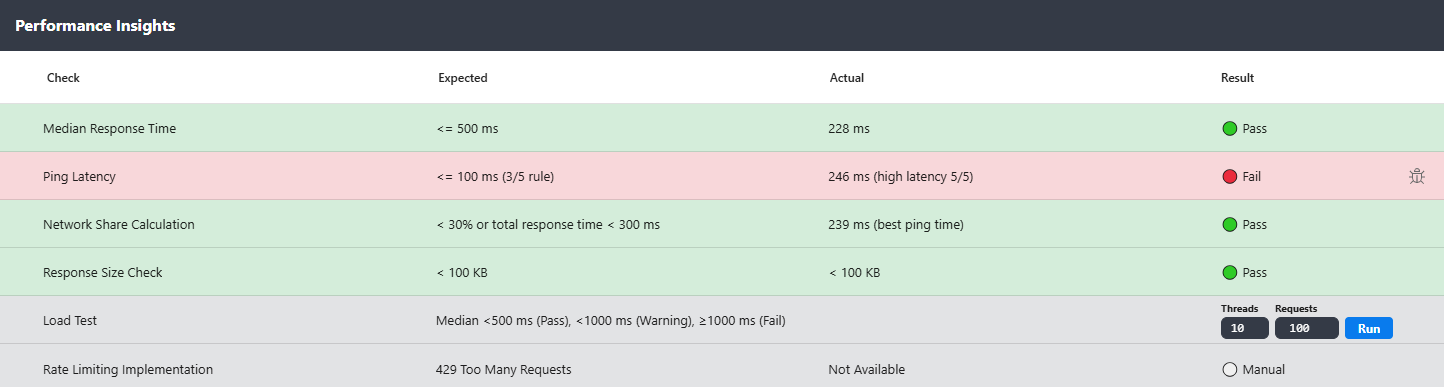
Rentgen executes a large set of generated API requests derived from a single known-good cURL.
Each request is timed. The median response time is calculated across the full run.
- TEST: Median Response Time
- Execution: sequential requests (no concurrency)
- Expected: ≤
500 ms - Fail condition: median >
500 ms
This threshold is intentionally conservative. If your API cannot respond consistently under 500 ms without any load pressure, something is already wrong.
Why median matters
Averages lie.
One fast response can hide several slow ones. One cached response can mask deeper problems.
Median response time cuts through that noise. It tells you what a “typical” request actually experiences.
If the median is slow, the API is slow — even if some requests look fine.
Why this matters even without load
A slow API without load is a bigger red flag than a slow API under pressure.
It usually means:
- inefficient queries
- unnecessary downstream calls
- blocking I/O
- overly expensive validation
- logic executed too early in the request lifecycle
None of these require traffic spikes to cause pain. They are baked into every request.
The practical workflow
This is where the test becomes useful, not theoretical.
- Import a cURL
- Send a request
- Verify the response
- Adjust field mappings if needed
- Run tests
After a few minutes, you don’t just get:
- data-driven test results
- security checks
- error handling validation
You also get performance insights — based on real request behavior, not synthetic benchmarks.
When the test fails
If the median response time exceeds the threshold, the test is marked as failed.
Not as a warning. Not as “interesting to monitor”. As a clear signal.
And this is the best part: you don’t need to explain it.
Next to the failed test, Rentgen provides a Copy Bug Report action.
One click copies a clean, professional bug report describing:
- what was tested
- what failed
- the measured response times
- why this is a problem
Paste it into Jira, Trello, Slack — whatever your team uses.
No screenshots. No explanations. No performance lectures.
Why this check exists in Rentgen
Because performance problems don’t start with load.
They start with slow, inefficient request handling that nobody notices because “functionally, it works”.
Rentgen makes that visible early — without requiring a separate tool, a separate test phase, or a separate discussion.
Final thoughts
You don’t need a full load test to know when something is wrong.
If your API is slow when nobody is using it, it won’t magically improve under traffic.
Median response time doesn’t lie. It just tells you something you might not want to hear yet.