
Ping is not an API feature. It does not validate business logic. It does not prove correctness. That’s exactly why it is so valuable next to performance insights.
Most teams never measure ping during API testing. They jump straight into response times and then argue about what they mean. Rentgen treats ping as a baseline signal, because without a stable network baseline, every “performance conclusion” becomes suspicious.
What this check is — and what it is not
Rentgen’s Ping Latency check is not trying to test “the API”. It is testing the path to the API: network round-trip time before any backend logic executes.
It is also not meant for every scenario. If you intentionally test an API across continents, through multiple edge layers, WAF/CDN hops, or mobile 4G/5G routes, ping can be dominated by internet routing and becomes a poor pass/fail indicator.
Rentgen is built around a different, common model: you are testing your own system from a nearby environment — same network, VPN, corporate routing, or at least the same region. That is how most internal and staging testing happens day to day.
What was tested
Rentgen runs 5 lightweight ping probes to the target host and evaluates them using a simple rule. The check is conservative by design and focuses on consistency, not perfect numbers.
- TEST: Ping Latency
- Execution: 5 probes
- Expected:
≤ 100 msfor at least 3 out of 5 samples (3/5 rule) - Fail condition: 3 or more samples exceed
100 ms
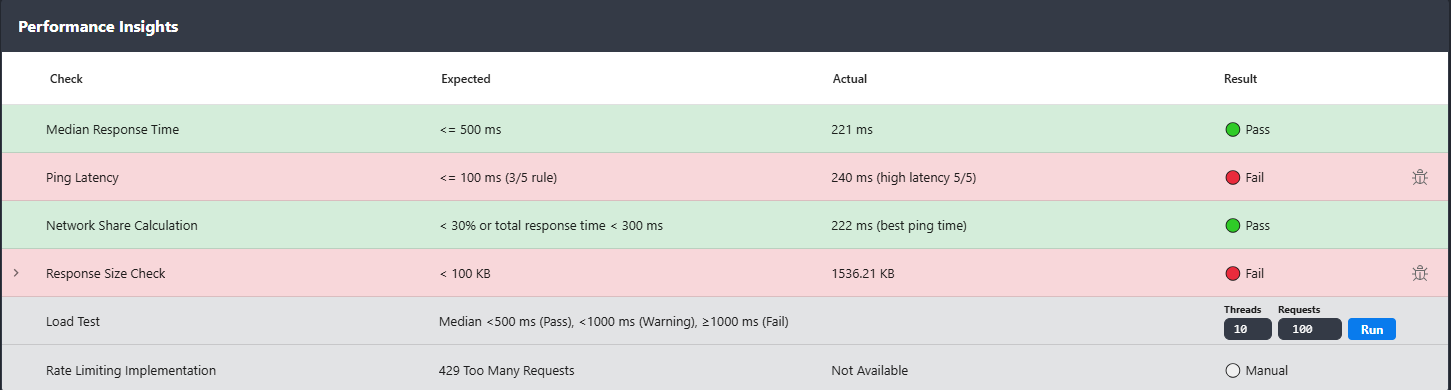
What Rentgen found
- TEST: Ping Latency
- Expected:
≤ 100 ms(3/5 rule) - Actual:
246 ms(high latency 5/5) - Status: 🔴 Fail
Why this is a FAIL in the Rentgen model
Because high ping breaks the interpretation of every other metric. If your response time is slow and ping is also slow, you cannot claim “the API is slow” with confidence. You might be measuring the network more than the service.
Rentgen assumes you are close enough to the system that ping should be stable and reasonably low. If 3 out of 5 probes exceed 100 ms in that environment, something is wrong at the infrastructure level: routing, DNS, region mismatch, overloaded gateway, packet loss, or simply too many internal hops.
In other words, this check is a guardrail. It prevents teams from wasting time optimizing application code when the real bottleneck is the path to the API.
The practical value
Ping answers a simple question that saves hours of confusion: is the API slow, or is the network slow?
Example: if the API responds in 400 ms and ping is 80 ms, then network overhead is a noticeable part of the total experience.
Many teams ignore that. Rentgen makes it visible in the same place where you look at performance.
If ping is 246 ms, then “slow API” is often not the right starting point.
The right starting point is: why is the baseline network latency that high in a supposedly controlled environment?
How to react when it fails
Treat it as a baseline issue. Before discussing backend optimization, verify the fundamentals: are you testing from the right region, is DNS resolving to the intended endpoint, are you going through unnecessary gateways, and is the route stable (no packet loss, no congestion, no hidden hops).
This is why the check is not “Info”. In the Rentgen model, a failed ping means the environment is not healthy enough to trust performance conclusions.
Why this check exists in Rentgen
Because most performance problems are diagnosed backwards. Teams start with response time dashboards and end up in debates. Ping gives you a clean baseline signal: what does the connection itself look like, before the API does anything?
Rentgen keeps it visible by default because it is simple, fast, and it prevents wrong conclusions. When the baseline is healthy, performance insights become meaningful. When the baseline is broken, Rentgen tells you that immediately.
Final thoughts
Ping is not an API test. It is a reality check. If your network latency is high in a controlled environment, your users will feel it no matter how perfect your backend code is. Fix the baseline first. Then measure the API.